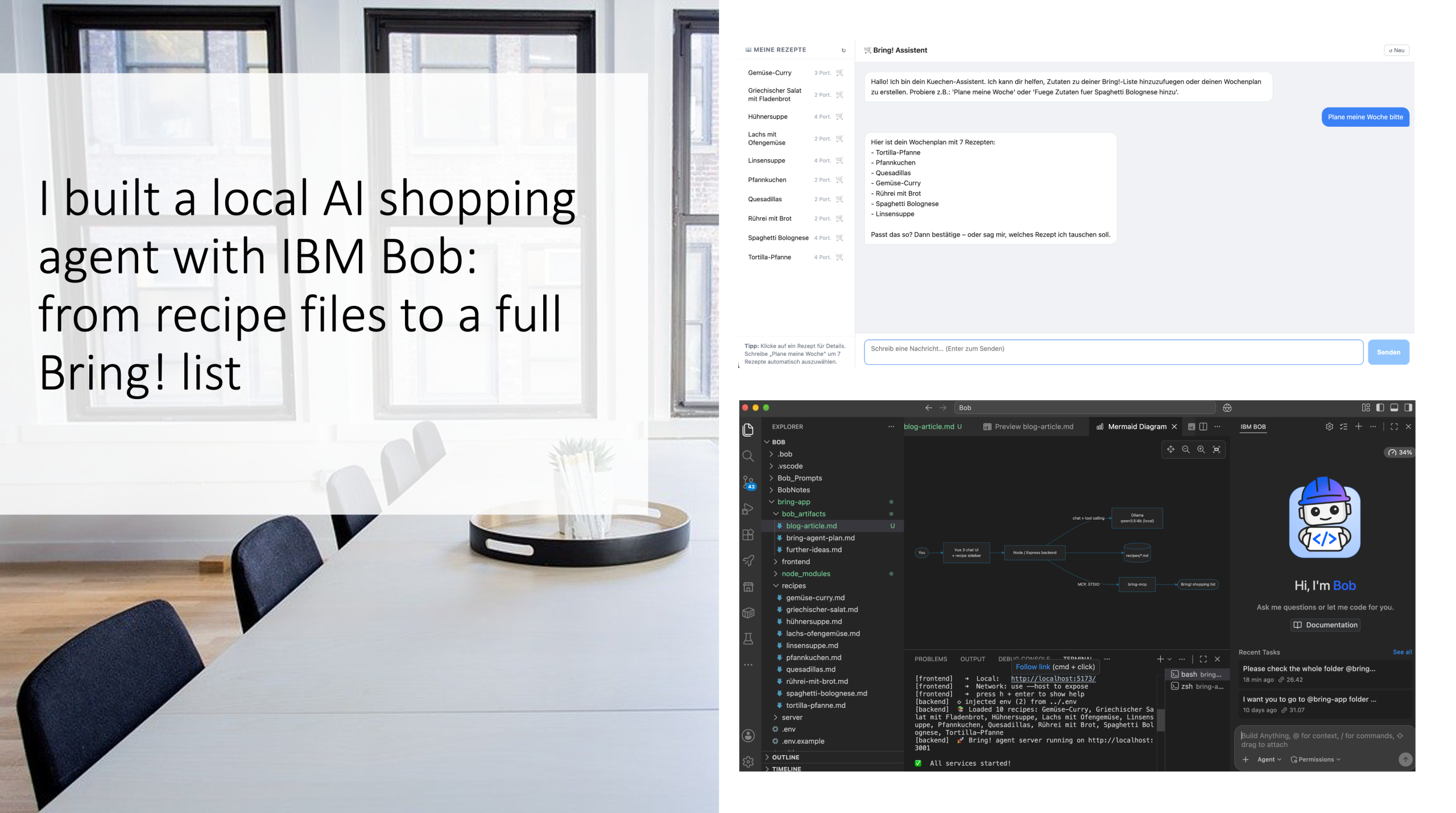
A Vue chat UI, a small Node backend, a 4B-parameter LLM running on my laptop, and an MCP server. Built with IBM Bob in minutes. Find the repo here: https://github.com/FelixAugenstein/bring-app-agent
The problem
Every week it is the same routine: decide what to cook, open the shopping list app, type in 40 ingredients. I already keep my favourite recipes as text. I use Bring! for shopping. The missing piece was something that connects the two without me doing the typing.
So I wanted a small agent that handles three situations:
- “Plan my week.” It picks recipes, shows me the plan, and only adds ingredients after I confirm.
- “Add the ingredients for Pfannkuchen.” One recipe, straight to the list.
- “2 Äpfel und 3 Bananen.” Loose items, no recipe involved.
And I had three requirements: it should run locally, it should need no API keys (apart from my own Bring! login), and the AI should be in the loop for every case, not just a fancy front end for a fixed script.
The result
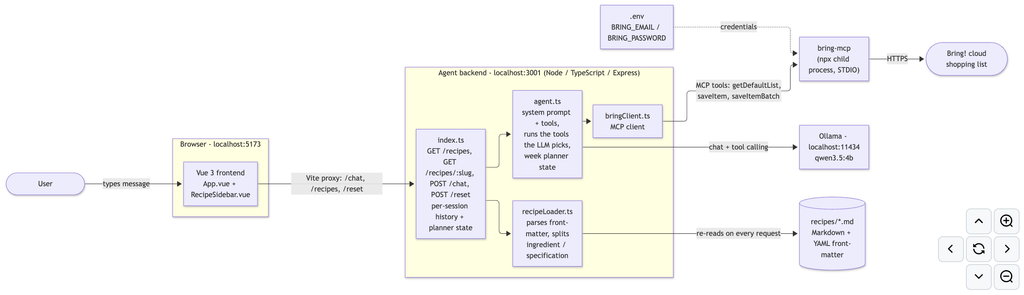
- Frontend: a Vue 3 chat window with a sidebar listing all recipes. Click a recipe to see its ingredients with amounts and the full instructions. Click the cart icon to add it to the list.
- Backend: a Node/TypeScript Express server that keeps the chat history, talks to the LLM and executes the actions.
- LLM:
qwen3.5:4brunning through Ollama. About 3.4 GB, runs on a normal laptop. - Recipes: plain Markdown files with a bit of YAML front-matter. Drop in a new
.mdfile and it shows up in the sidebar and for the agent, no restart needed. - Bring! access: the open-source
bring-mcpMCP server, started on demand by the backend.
One command starts everything: ./start.sh.
Find the repo here.
How it works: the LLM decides, the server executes
The most important design decision was to let the model choose what to do, but never let it invent results. The backend gives the model a system prompt that lists only the recipes that really exist, plus six tools:
| Tool | What it does |
|---|---|
propose_week_plan | Picks N recipes, stores them as “pending” and asks me to confirm. Nothing is added yet. |
confirm_week_plan | After my “yes”, sends all ingredients of the pending recipes to Bring!. |
swap_recipe_in_plan / cancel_week_plan | Replace one recipe in the proposal, or throw the proposal away. |
add_recipe_to_list | Adds the ingredients of a single recipe. |
add_items_to_list | Adds free-form items like “2 Äpfel und 3 Bananen”. |
When I type a message, the model answers with a tool call. The server runs it and shows me the real result. That means:
- The model cannot claim “done!” when nothing was added.
- Ingredients for recipes come from the recipe file, not from the model’s imagination.
- Adding to the list always requires an explicit confirmation step for the weekly plan.
All of it lands on one specific Bring! list (in my case “Einkauf Supermarkt”), which the backend looks up by name and which is configurable in .env.
What I learned along the way
Building this was not a straight line, and the detours were the most interesting part.
1. Small models and made-up output formats don’t mix. My first version asked the model to write a special tag like <action>…</action> in its answer, which the server then parsed. A 4B model mostly ignored that format. The fix was to switch to Ollama’s native tool calling. The model is trained for exactly that, and the reliability difference was big.
2. Turn off “thinking” for this kind of job. Reasoning mode made replies noticeably slower with no benefit for “pick a tool and fill in two arguments”. Setting think: false made the chat feel instant.
3. Make the server the source of truth. Everything that has side effects, such as writing to Bring!, happens in server code, not in model text. The model’s job is to understand German or English and route the request.
4. Hot-reload what the dev tooling doesn’t watch. tsx watch restarts the backend when code changes, but it does not watch the recipes/ folder. Rather than telling myself to restart the server, the backend simply re-reads the folder on every request. New recipe files just appear.
5. Stale processes are sneaky. At one point an old backend still held port 3001 and happily served old code while I debugged the new one. start.sh now refuses to start when its ports are taken, waits until both services are really ready, and prints prefixed [backend] / [frontend] logs and the links to open.
Where IBM Bob fit in
I did not hand-write this project line by line. I described what I wanted, and IBM Bob did the work with me: it planned the sub-tasks, scaffolded the Vue frontend and the Node backend, wired up the MCP client, wrote the recipe loader and the start script, and fixed the bugs above as we hit them. It also reviewed the plan against the code, translated and extended the README (including the architecture diagram), and kept the type-checks green.
The first working version took minutes, not days. The rest of the time went into the interesting refinements: switching to tool calling, targeting the right shopping list, and the recipe detail view. Those were conversations (“make recipes clickable and show the full recipe”), not tickets.
A few things made that workflow pleasant:
- A written plan first. Bob produced an implementation plan with sub-tasks and a decision log, which I could correct before any code existed.
- Verification as part of the loop. Type-checks and small endpoint tests were run before anything was reported as done.
- It respected my constraints. For example, “the LLM must stay involved in every use case” was not traded away for a quick server-only shortcut.
Try it yourself
You need Node.js 22+, Ollama, and a Bring! account with email and password login. Find the repo here.
git clone https://github.com/FelixAugenstein/bring-app-agent.git
cd bring-app-agent
cp .env.example .env        # add your Bring! email and password
npm install
(cd server && npm install)
(cd frontend && npm install)
./start.sh                  # pulls the model on first run, then opens everything
Then open http://localhost:5173 and try:
Plane meine WocheFüge Zutaten für Spaghetti Bolognese hinzu2 Äpfel und 3 Bananen
Your credentials stay in your local .env, which is git-ignored.
What’s next
The obvious next steps are scaling servings up or down per recipe, skipping ingredients I already have at home, and letting the agent suggest a plan based on what is already on my list. Because every capability is just a tool definition plus a small function, adding them is straightforward.
Credits
bring-mcpby Florian Wittkamp, the MCP server that makes the Bring! integration possible.- Ollama and the Qwen model family for local LLM inference.
- IBM Bob for building the app and agent with me.
This project is not affiliated with or endorsed by Bring!.